Remote Support for Windows customer's computers
The application is labeled "Helpdeskv4".
Helpdesk does not require installation and does not make use of the
registry.
The customer only has to download the 166kb executable file and
"Double Click" on it in order to make a connection.
The connection is initiated by the application on the customers request,
to allow easy access through the customers firewall.
This application has been tested with Windows XP (Home and Professional) and Windows VISTA. It has not yet been tested with Windows 7.
TIPS:
Keep the application handy on your Desktop for easy access. With it's bright yellow IE icon, it should be easy to find on your Desktop.

Call the phone number in the window first in order to insure someone is available to help you.
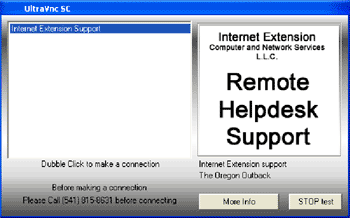
Once you have double clicked on "Internet Extension
Support" (shown highlighted
in blue above), a green icon will appear in the application tray.
When you wish to disconnect your remote support connection, right click on the green icon in your "Task Bar" and select "Close".
When not active, this application is 100% secure and is completely innocuous.
When you click on the above link, a Windows
dialog box should open asking if you really want to download the file. Click
"Save File".
It should download to the location you have designated your browser to download
files to. By default, this is usually your Desktop.